Method 1: Apple's built-in Pickleball workout
The Workout app has a Pickleball workout built in, so you don't need to install anything.
How to start it
- Open the Workout app on your Apple Watch.
- Turn the Digital Crown to scroll to the bottom of the workout list.
- Tap the Add button (+). On watchOS 10 and 11 it's labeled Add Workout.
- Choose Pickleball.
- Tap the Play button to start. On watchOS 10 and 11, tap the workout to start.
- When you finish, swipe right and tap End. On watchOS 26 and later, you can then turn the Digital Crown to rate your effort. On watchOS 11, scroll down and tap Add Effort first.
The list order changes based on the workouts you use, so Pickleball gets easier to find.
What it tracks
Raise your wrist during play to see elapsed time, calories burned and heart rate. Apple's pickleball tips suggest adding the Heart Rate Zones view. To add it on watchOS 26 and later, tap the Views button on the workout. On watchOS 11, tap More Options, then Preferences, then Workout Views. Heart rate zones need your date of birth in the Health app. After the game, your workout shows up in the Fitness app on iPhone and in the Health app.
What it doesn't track
Apple's documentation lists no shot, swing or score metric for pickleball or any other racket sport. So the built-in workout doesn't count your shots, tell forehands from backhands, estimate swing speed or keep score.
Two things to know
- Start the workout yourself before you play. Apple doesn't say whether the watch detects pickleball on its own.
- Auto-Pause won't help. Apple describes it only for outdoor running and cycling workouts.
Method 2: PickleWatch for shots, grades and score
PickleWatch is an Apple Watch app that detects each swing from your wrist motion. It needs watchOS 9.6 or later on the watch and iOS 17.6 or later on the iPhone. The watch app comes with the iPhone app. Setup on the iPhone asks for your height, your skill level and access to Apple Health.
How to track a game
- Open the PickleWatch app on your watch.
- On the home screen, pick LEFT or RIGHT to match the wrist you wear the watch on. Wear it on your paddle hand.
- Tap START. Tracking begins right away, with no countdown.
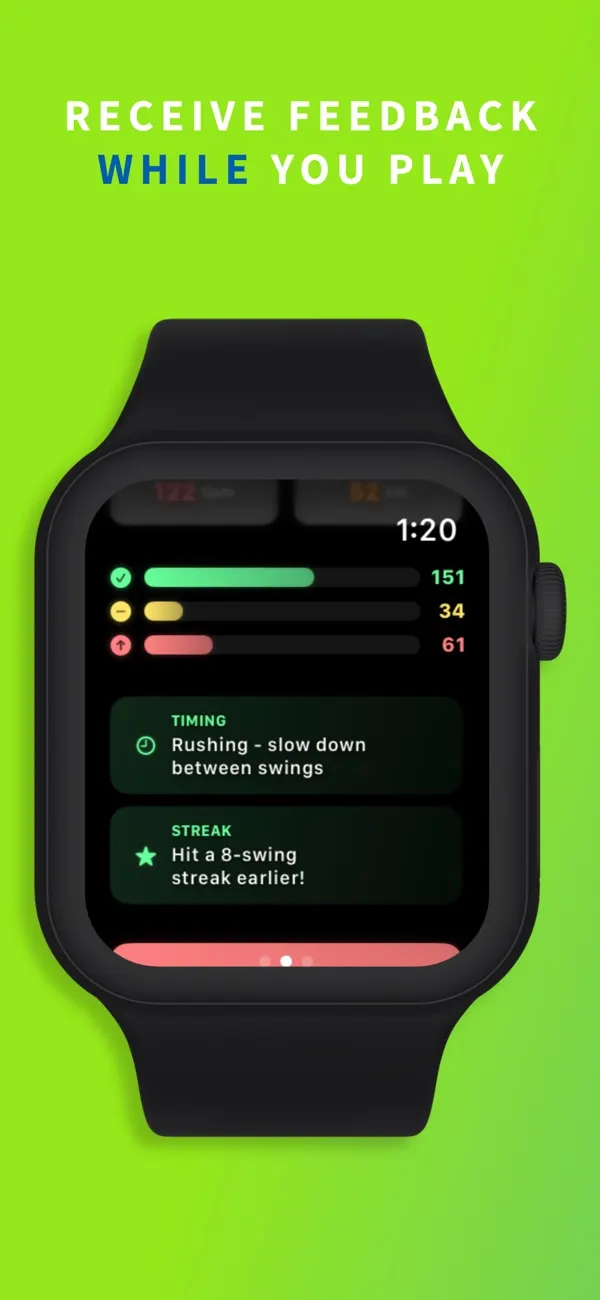
- Play. A "Learning Your Swing" banner counts your first five swings. Text tips start after that. After each swing, the screen flashes green, yellow or red.
- To keep score, swipe to the page on the right of the dashboard. Pause is on the page to the left.
- Tap End Session. Your summary appears on the watch. The session is sent to your iPhone right away, or later when the phone is back in range.
What it adds
- Swing count and grades. Each swing gets a green, yellow or red grade as you play. The grade compares the swing's estimated speed with your fastest swing so far and your skill level. A swing with the right duration for its shot type can move up from yellow to green. Grades are tuned to be encouraging, so treat them as motivation, not a technique analysis.
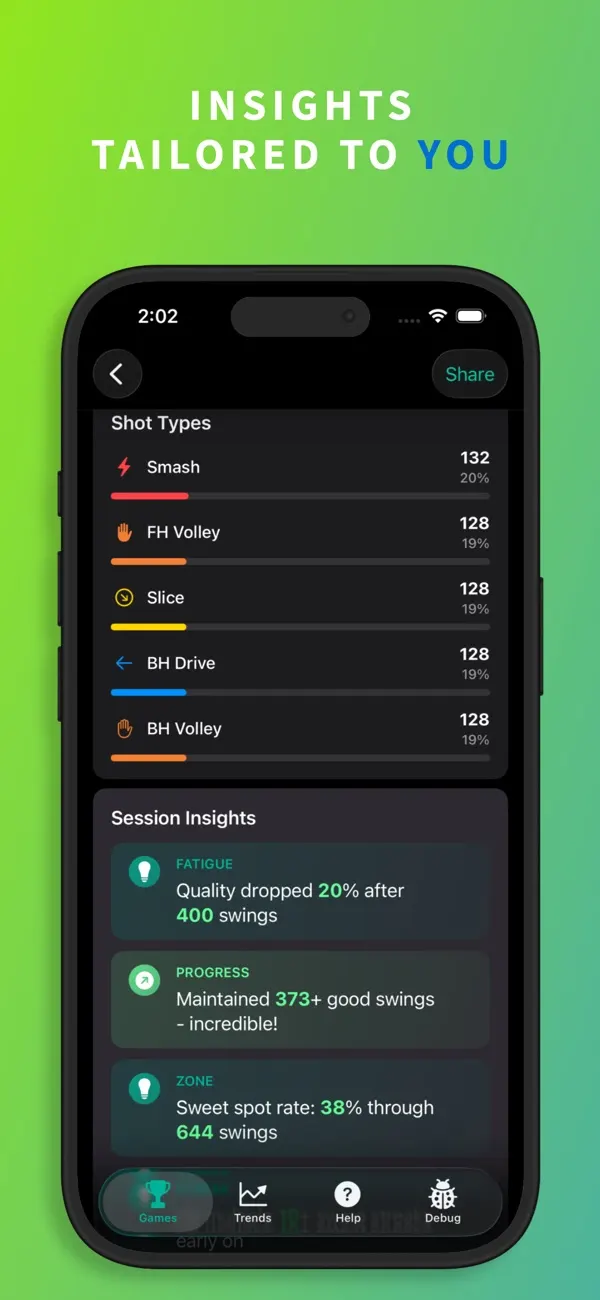
- Shot types. The summary sorts your swings into forehand and backhand dinks, drives and volleys, plus slices and smashes. Shot names appear after the session, not during play. Serves are not detected.
- Estimated swing speed. The watch shows the estimated speed of your last swing in mph. The summary shows your top and average speed. The number comes from how fast your wrist rotates. It estimates swing speed, not ball speed.
- Score keeping. Add points for your side or your opponents' side with a tap. Games are played to 11 and must be won by 2. A GAME POINT label appears when a side is one point from winning.
- Apple Health workout. If you allow Health access, each session is saved as a Pickleball workout with heart rate and calories. Don't start one in the Workout app too. The watch runs one workout at a time, so starting a second one ends the first.
Workout app vs PickleWatch
Apple Workout app
Cost: free and built in.
Heart rate and calories: yes.
Saves to Apple Health: yes, and to Fitness.
Swing count and shot types: no.
Swing speed: no.
Score keeping: no.
PickleWatch
Cost: tracking on the watch is free. iPhone history needs PickleWatch Pro.
Heart rate and calories: yes, if you allow Health access.
Saves to Apple Health: yes, as a Pickleball workout.
Swing count and shot types: yes. Serves aren't detected.
Swing speed: estimated, in mph.
Score keeping: yes, to 11, win by 2.
The Workout app is enough for time, calories and heart rate. PickleWatch adds swing counts, shot types, speed estimates and score keeping.
Tips for accurate tracking with PickleWatch
- Wear the watch on your paddle hand, even if you hit two-handed backhands.
- Set LEFT or RIGHT before you tap START. The wrong wrist setting can mix up your forehands and backhands.
- Set your skill level in the watch app's Settings, under Profile. It changes how strictly swings are graded. Intermediate and Advanced are in beta.
- Set your height in the same place. The speed estimate uses it to adjust for arm length. The height setting is also in beta.
- Haptics are off by default. To feel a tap on your wrist after each swing, use Unmute Haptics in Settings.
- The app may miss a soft dink now and then. It is tuned to avoid false counts when you walk or adjust your watch.
- If a session doesn't show up on your iPhone, keep the phone near the watch with Bluetooth on. If the phone is out of range, the watch holds the session and sends it later. Sessions with no swings aren't sent.
Questions
Does Apple Watch have a pickleball workout?
Yes, it's one of the workout types in the Workout app. Apple added a pickleball activity type to HealthKit in watchOS 7 (2020). The Workout app has offered it since at least late 2021. If your watch doesn't list it, Apple says to choose Other.
I can't find Pickleball or the Add button. What should I do?
Scroll all the way down. The Add button (Add Workout on watchOS 10 and 11) is below the last workout. Pickleball is inside it. If it's still missing, people on Apple Community suggest these fixes: force quit the Workout app, update watchOS, and restart your watch and iPhone.
Does Apple Watch count pickleball shots or swings?
Not with the built-in workout. Apple lists no shot or swing metric for pickleball or other racket sports. PickleWatch counts your swings, grades each one and sorts them by shot type.
Is the Apple Watch pickleball workout accurate?
Apple says heart rate readings are better for rhythmic movement, such as running or cycling. They are less reliable for irregular movement, such as tennis or boxing. If you can't get consistent readings, Apple says you can connect an external heart rate monitor, such as a Bluetooth chest strap. Apple doesn't publish a calorie formula for pickleball. For calories, it says the Workout app can use the accelerometer and the heart rate sensor.
Why are my exercise minutes or steps so low after pickleball?
Start a workout before you play. One player on Apple Community played for two to three hours without a workout and got about 5 exercise minutes. Once they started the Pickleball workout, exercise minutes roughly matched play time. Steps can look low too. Another user logged about 2,000 steps in two hours. A reply said the watch counts steps from the swing of your arm, not your feet.
Do I have to bring my iPhone to the court for PickleWatch?
No. All swing detection runs on the watch. Each session syncs to your iPhone when the phone is back in range.
Is PickleWatch free?
Tracking and the end-of-session summary on your Apple Watch are free. Your history, trends and achievements in the iPhone app need PickleWatch Pro, a subscription.
About the author
I'm George Yameen, a solo indie developer. I build sports apps for Apple Watch because I love these sports and wanted a better way to track my own game. Questions about this guide? Get in touch or find me on X at @GeorgeYameen.