Method 1: Apple's built-in Badminton workout
The Workout app has a Badminton workout built in, so you don't need to install anything.
How to start it
- Open the Workout app on your Apple Watch.
- Turn the Digital Crown to scroll to the bottom of the workout list.
- Tap the Add button (+). On watchOS 10 and 11 it's labeled Add Workout.
- Choose Badminton.
- Tap the Play button to start. On watchOS 10 and 11, tap the workout to start.
- When you finish, swipe right and tap End. On watchOS 26 and later, you can then turn the Digital Crown to rate your effort. On watchOS 11, scroll down and tap Add Effort first.
If Badminton is already in your list, just tap it. The list order changes based on the workouts you use, so Badminton gets easier to find.
What it tracks
Raise your wrist during play to see elapsed time, calories burned and heart rate. Before you start, you can change what it shows. On watchOS 26 and later, tap the Views button on the workout. On watchOS 11, tap More Options, then Preferences, then Workout Views. After the match, your workout shows up in the Fitness app on iPhone and in the Health app.
What it doesn't track
Apple's documentation lists no shot, swing or score metric for badminton or any other racket sport. So the built-in workout doesn't count your shots, tell a clear from a smash, estimate swing speed or keep score.
Two things to know
- Start the workout yourself before you play. Apple doesn't say whether the watch detects badminton on its own.
- Auto-Pause won't help between rallies. Apple describes it only for outdoor running and cycling workouts. To pause by hand, press the side button and the Digital Crown at the same time.
Method 2: BadmintonWatch for shots, ratings and score
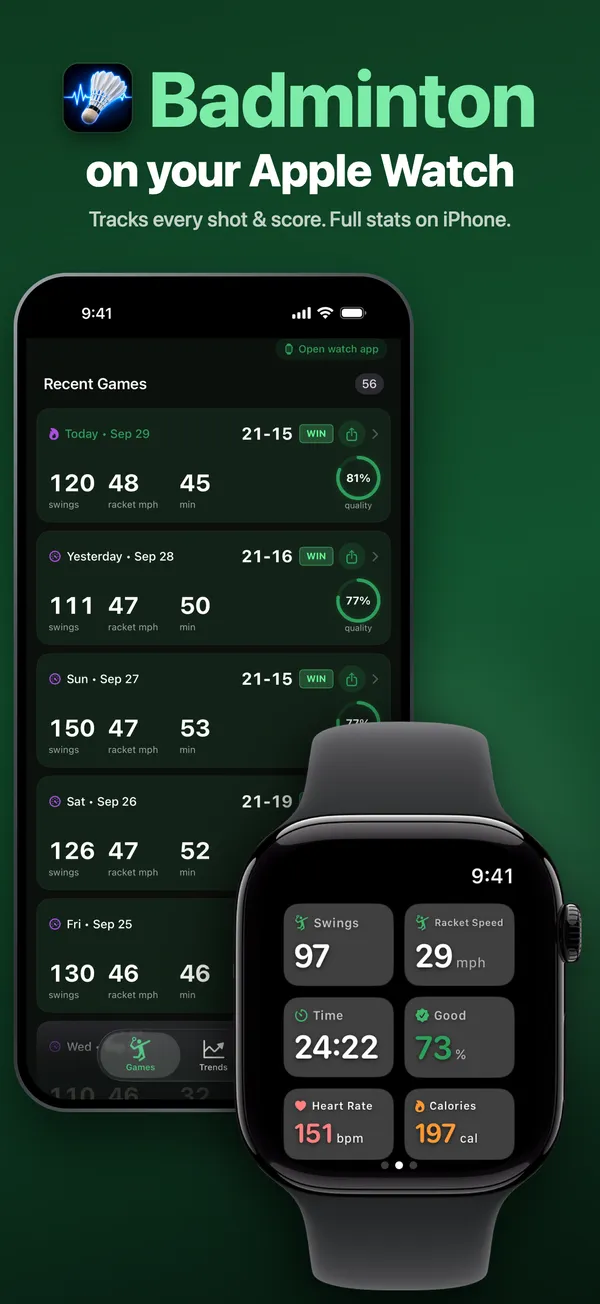
BadmintonWatch is an Apple Watch app that detects your swings from your wrist motion. It needs watchOS 9.6 or later on the watch and iOS 17.6 or later on the iPhone. The watch app comes with the iPhone app. Setup on the iPhone asks for your height, your skill level and access to Apple Health. You can skip height and skill level, and you can decline Health access. Setup ends on a paywall for the iPhone app. You don't need to pay to use the watch app.
How to track a match
- Open the BadmintonWatch app on your watch.
- On the home screen, pick LEFT or RIGHT to match the wrist you wear the watch on. Wear it on your racket hand.
- Tap START. Tracking begins right away, with no countdown.
- Play. A "Learning Your Swing" banner counts your first five swings. Text tips start after that. After each swing, the screen flashes green, yellow or red.
- To keep score, swipe to the page on the right of the dashboard. After each rally, tap the score of the side that won it, YOU or OPPONENTS. Before the first rally, you can tap a side's marker to pick who serves first. Pause is on the page to the left.
- Tap End Session. Your summary appears on the watch. The session is sent to your iPhone right away, or later when the phone is back in range.
What it adds
- Swing count and ratings. Each swing gets a green, yellow or red rating as you play. Smashes, clears, lifts and drives are rated against your own fastest swings. Net shots, drops and blocks are rated against set speed ranges. The ratings are tuned to be encouraging, most of all at Beginner level, so treat them as motivation, not a technique analysis.
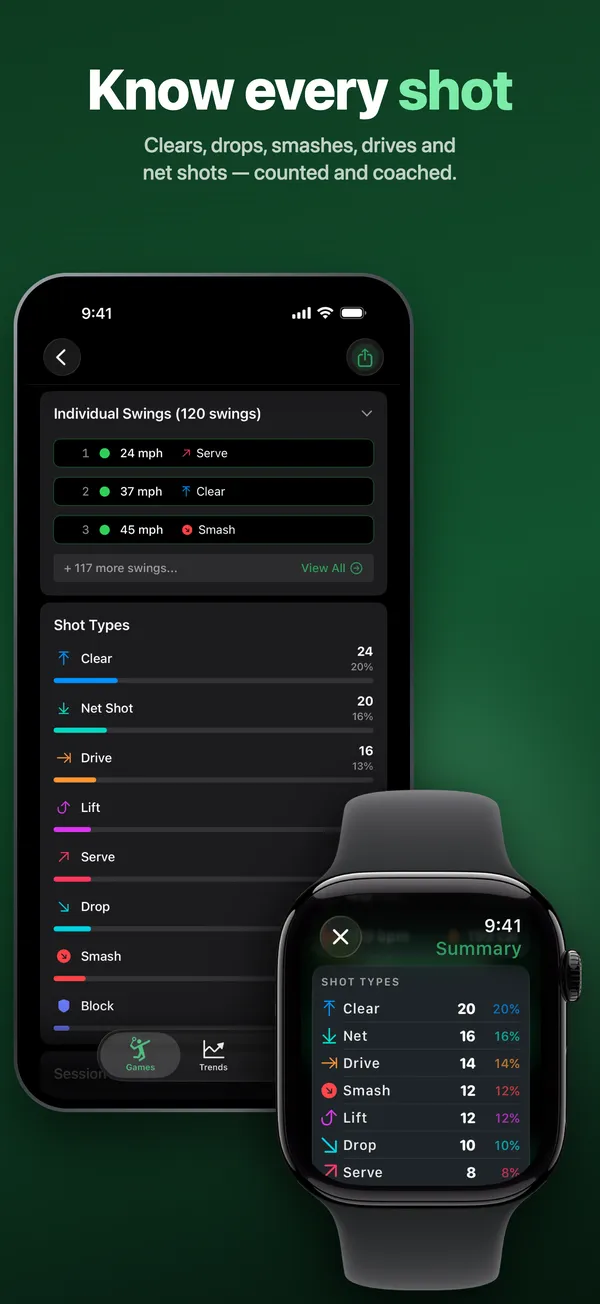
- Badminton shot types. The summary sorts your swings into clears, drops, smashes, drives, net shots, lifts and blocks. The first swing after a pause of three seconds or more can count as a serve. Shot names appear after the session, not during play. Forehands and backhands aren't counted separately.
- Estimated swing speed. The watch shows the estimated speed of your last swing in mph. The summary shows your top and average speed. The number comes from how fast your wrist rotates, adjusted for your height setting. It estimates swing speed, not shuttle speed.
- Rally scoring. Every rally scores a point. Games go to 21, won by 2, and at 29-29 the next point wins. Matches are best of three. The minus button next to the score takes back the last point. A SERVE badge shows who's serving and from which court: the right when the serving side's score is even, the left when it's odd. It flags the interval when the leading score reaches 11. To reset the current game to 0-0, tap the reset arrow or press and hold a score, then confirm. Finished games are kept. There's no option for other scoring formats.
- Apple Health workout. If you allow Health access, each session is saved as a Badminton workout with heart rate and calories. Don't start one in the Workout app too. The watch runs one workout at a time, so starting a second one ends the first.
Workout app vs BadmintonWatch
Apple Workout app
Cost: free and built in.
Heart rate and calories: yes.
Saves to Apple Health: yes, and to Fitness.
Shot count and shot types: no.
Swing speed: no.
Score keeping: no.
BadmintonWatch
Cost: tracking on the watch is free. The iPhone app, with your history and trends, needs a paid plan.
Heart rate and calories: yes, if you allow Health access.
Saves to Apple Health: yes, as a Badminton workout.
Shot count and shot types: yes, including smashes, net shots and lifts.
Swing speed: estimated, in mph.
Score keeping: yes, rally scoring to 21, best of three, with a serve badge.
The Workout app is enough for time, calories and heart rate. BadmintonWatch adds shot counts, badminton shot types, speed estimates and rally scoring.
Tips for accurate tracking with BadmintonWatch
- Wear the watch snugly on your racket hand.
- Set LEFT or RIGHT before you tap START.
- Set your skill level in the watch app's Settings. It changes how strictly swings are rated. Intermediate and Advanced are in beta.
- Set your height in the same place. The speed estimate uses it to adjust for arm length. The height setting is also in beta.
- Haptics are off by default. To feel a tap on your wrist after each swing, swipe to the page on the left during a session and tap Sound.
- Soft net shots and blocks may not register, and neither may a second swing within about half a second of the first. The app is tuned to ignore walking and watch adjustments, so they usually don't count as swings.
- Don't force quit BadmintonWatch during a session, or your swings from that session are lost. Sessions with no swings aren't sent to your iPhone. If a session doesn't show up there, keep the phone near the watch with Bluetooth on.
Questions
Does Apple Watch have a badminton workout?
Yes, Badminton is one of the workout types in the Workout app. If it isn't in your list, scroll to the bottom and tap the Add button. On watchOS 10 and 11 the button is labeled Add Workout.
Does Apple Watch count badminton shots or keep score?
Not with the built-in workout. Apple lists no shot, swing or score metric for badminton. BadmintonWatch counts your swings, names your shots in the summary and keeps the rally score.
Does Apple Watch detect badminton automatically?
Apple doesn't say it does. Its guide mentions workout reminders for walking, running, swimming and other workouts, without naming badminton. Start the workout yourself before you play.
Is the Apple Watch calorie count accurate for badminton?
Apple gives no accuracy figure for calories, so treat the number as an estimate. Apple says heart rate readings are better for rhythmic movement, such as running or cycling, than for irregular movement, such as tennis or boxing. If you can't get consistent readings, Apple says you can connect an external heart rate monitor, such as a Bluetooth chest strap.
Does BadmintonWatch work for doubles?
Yes, for your own swings and the score. The watch counts the swings of whoever wears it. The score badge follows the serving side's score, which is the same rule in singles and doubles, but it doesn't track which partner serves.
Do I have to bring my iPhone to the court for BadmintonWatch?
No. Swing detection and score keeping run on the watch. Each session with at least one swing syncs to your iPhone when the phone is back in range.
Is BadmintonWatch free?
Tracking, score keeping and the end-of-session summary on your Apple Watch are free. The iPhone app, with your history and trends, needs a paid plan.
About the author
I'm George Yameen, a solo indie developer. I build sports apps for Apple Watch because I love these sports and wanted a better way to track my own game. Questions about this guide? Get in touch or find me on X at @GeorgeYameen.